Every organization that handles inbound mail eventually has to decide who runs its digital mailroom, its own team or a provider. That decision rarely gets made on day one. Mailroom budgets pass approval without trouble. Nine months later, a second site opens, the person who can tell a subpoena from a statement resigns the week before the legal asks for an audit trail, and the scanner sized for 400 pieces a day is facing 900. That is when making the choice between in-house vs outsourced digital mailroom services becomes urgent.
An in-house digital mailroom means you own the hardware, the people and the compliance evidence, Outsourced digital mailroom services is where a provider receives your incoming mail at a secure facility, opens and scans it, extracts the key data and delivers each item into your systems. You keep ownership of the records and every business decision. Providers such as XBP Global run this across more than 59 secure processing centers in 17 states, so mail goes to the nearest site and never piles up at yours. Accountability stays with you either way.
This guide covers:
How the two models differ on cost, staffing, compliance and exit
What each model costs, with an example of when outsourcing saves money
How to choose a provider and run the transition
The Core Differences Between In-House vs Outsourced Digital Mailroom
The in-house vs outsourced digital mailroom choice is really a decision about which risks you keep. Who opens the mail and fixes what goes wrong. Who holds the evidence when an auditor asks. What happens when volume doubles in a quarter nobody planned for. Providers such as XBP Global run all of it as one managed operation, so the comparison below is about ownership at every point where something can break.
Seven parameters decide this in practice, and buyers routinely underweight the last two. The table sets both models against each one with enough detail to carry into a procurement conversation. Read the compliance and exit rows twice, because those are the two that cost the most to fix once a contract is signed.
What You Are Comparing
In-house Digital Mailroom
Outsourced Digital Mailroom
Cost shape
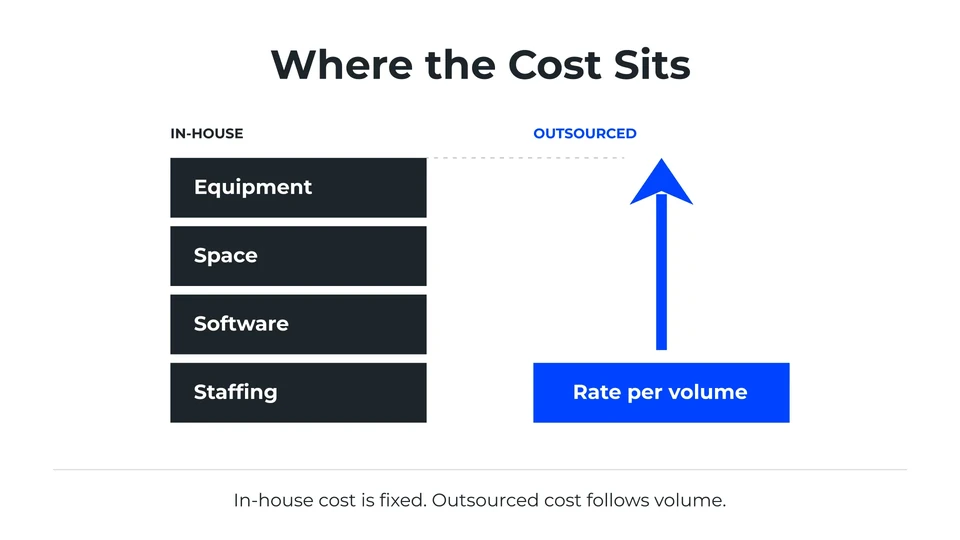
You carry equipment, floor space, software renewals and payroll whether 200 pieces arrive or 2,000, so the bill stays flat while volume moves underneath it.
You pay a rate against items processed, so the bill tracks what actually arrived that month and the fixed stack leaves your budget entirely.
Time to a live operation
Procurement, installation, hiring and training each wait on the one before, which is why internal builds get measured in months and the clock only starts after budget approval.
You are added to an operation that already runs, so work starts in days and the limiting factor becomes your own data mapping.
Staffing and coverage
One trained operator is a single point of failure, so real coverage means a second person for the gaps and a third senior enough to resolve what nobody can classify.
Coverage is written into the contract, so vacation, illness and resignation become the provider’s staffing problem and never surface as your backlog.
Peak and growth capacity
Capacity is fixed at whatever you installed and hired for, so a seasonal peak or an acquisition turns straight into overtime, agency cover and a queue.
The same peak gets absorbed across a shared base that is already built, so growth costs you a higher invoice and nothing more.
Compliance evidence
You write the controls, document them, fund the audit that proves them, and repeat that work every cycle before a counterparty will accept it.
HIPAA, SOC 2 and SSAE 18 are already held and already examined.
Control and oversight
Control means walking downstairs and looking at the pile, which is immediate, informal, and leaves almost nothing behind as evidence.
Control means service levels, exception reports and audit rights you negotiated before signing, which is slower in the moment and far stronger in an audit.
Exit and switching
Changing your own process is a project you schedule and fund yourself, with no contract to renegotiate and no data to recover from a third party.
Exit terms decide how painful this gets later.
Which brings us to the number everyone opens this comparison to find.
What In-House and Outsourced Digital Mailrooms Actually Cost
An in-house digital mailroom is a fixed monthly cost, and an outsourced one is a rate that follows your volume. Running it yourself means paying for the full stack every month. Scanners on a refresh cycle, leased floor space, software renewals, integration upkeep, and a payroll line that exists whether 200 pieces arrive or 2,000. US mail volume was 108.7 billion pieces in fiscal 2025, so that load is not going away on its own [1]. Outsourcing converts the same work into a rate you pay against volume, and operations such as XBP Global publish their bands openly.
What the ROI Arithmetic Looks Like
Published tiers give you a real figure to work against. Entry service runs $299 a month for 1,000 scans, roughly 500 pieces of mail, moving to $499 for 2,000 and $3,500 for 10,000, with extra images at 20 cents each. Enterprise volume is scoped separately, so if you process forty thousand pieces a month, that is not your number. What the bands prove is that the variable side is knowable. Total your own fixed stack for one month, divide by pieces processed, and set your per-item figure beside the published digital mailroom pricing.
What It Looks Like in Practice
Say your in-house fixed stack totals $7,000 a month and handles about 5,000 pieces of mail, which is roughly $1.40 a piece. The published 10,000 scan tier covers those same 5,000 pieces for $3,500, or roughly $0.70 a piece, so outsourcing halves the cost per piece. These figures are illustrative, so swap in your own fixed stack to test it.
Let’s look at a real-world case of an outsourced digital mailroom. A US mortgage lender saw loan volumes double in 18 months, and its manual document process could not keep up. After moving its mortgage document intake to a digital mailroom, it cut costs by 20 percent, reduced storage costs by 15 percent and now saves more than $10 million a year.
Five conditions do most of the deciding.
Five Reasons Organizations Outsource Their Digital Mailroom
Digital mailroom outsourcing is usually decided on operational facts, with price confirming it afterward. Mailroom service providers hear the same five conditions in almost every first call, and mailroom management companies compete largely on how well they absorb the variability those conditions create. Providers such as XBP Global carry capacity across many client sites at once, so the surge you would otherwise buy and staff is already installed. Each of the five below is enough on its own, and most organizations arrive carrying two or three.
More than one receiving location. Multi-site intake breaks at the handoff. A document landing at the wrong office has to be spotted, forwarded and tracked, and each step costs a day and a custody gap. One US supermarket chain centralized invoice intake and cut AP headcount by half, with lost invoices and duplicate payments gone.
Payments arrive by mail and cannot wait. Checks, remittances and claims sitting in a sorting queue hold up cash every day they wait. A Fortune 500 insurance group moved to same day payment processing, cut mailroom processing costs by 30 percent and accelerated $1.8 billion in annual deposits, with reconciliation falling from days to hours.
Staff who work outside the building. Hybrid work broke the assumption that mail and the person who needs it share a building. One top US bank enabled secure remote mail access for 55,000 employees, cleared 800 backlogged documents immediately, and finished in 8 days. Procurement alone takes longer internally.
An attestation you would otherwise build. Some material has to be traceable from arrival to delivery, and proving that internally takes months of controls and audits. One telecommunications enterprise spanning over 100 floors added a chain of custody tracking for its sensitive legal documents and recovered more than six hours of staff time every day.
A contract that ends or a vendor that fails. Switching providers midstream is where mail operations break. One organization saw its incumbent vendor breach its contract with no transition period, and its new provider processed daily transactions from day one with full success, then exceeded every SLA in its first year.
Knowing the model fits still leaves you choosing an operator.
How to Choose an Outsourced Digital Mailroom Provider
Every digital mailroom service provider will show you the same capability list, so feature comparison doesn’t tell you much at this stage. What separates two credible proposals is scope, measurement and behavior on a bad day. If you have been searching for which companies offer digital mailroom services, start with eight questions, asked in writing and scored side by side before anybody talks about commercials. Vague answers are themselves an answer, and the two questions that draw the most hedging are usually numbers four and six.
Eight Questions to Put in Writing
Send these verbatim and score what comes back.
Which named facilities and systems sit inside your attestation scope
What a business associate agreement covers for protected health information
Guaranteed turnaround from physical receipt to availability in our system
Measured extraction accuracy, and the method behind it
Destination systems already integrated, with reference clients running them
What happens to a document nobody can classify, who resolves it, how fast
Retention and destruction policy, including evidence of destruction
Transition phasing and exit terms, including who holds the data if we leave
What the Transition Actually Takes
A credible transition runs in five steps, and each one should carry a date in writing.
Map every mail type and the system each one feeds.
Move one document type first, usually the simplest high volume one.
Run both operations in parallel and compare output until they match.
Set a dated target for clearing any backlog.
Hand over the remaining document types in phases, with sign off at each stage.
A provider who cannot commit to a date for clearing your backlog has not sized your volume.
Making the Call: Should You Outsource Your Digital Mailroom
Whether you should outsource your digital mailroom comes down to four facts about your own operation, and you already know all four. Answer them honestly. Two or more pointing outward make the outsourced model the lower risk choice, and the cost example above shows how to put a number on it. One is worth a conversation. None of them, and you should build.
How many locations receive mail today?
Whether volume twelve months out will look like now.
How many people who need what arrives sit outside the building?
Whether you need an attestation sooner than you can build and audit one.
If your answers pointed outward, here is what sits on the other side.
Why Choose XBP Global for Digital Mailroom Services
A Major Player in the IDC worldwide mailroom assessment published in July 2026, XBP Global runs digital mailroom services as a managed operation across thirteen industries, from banking and insurance through healthcare, legal, public sector, retail and transportation. The model itself is deliberately simple. Mail arrives at a controlled site, becomes a searchable digital record the same day, and reaches whoever needs it wherever they happen to be working. What sits underneath is the part worth checking against the eight questions you just read, and none of it requires software your team has to license, learn or maintain in-house.
What Runs Under the Service
Everything below is standing capability, available today.
HIPAA, SOC 2 and SSAE 18 standards across all digital mailroom operations
256-bit encryption, full chain of custody tracking, and text redaction
Capture at 300 dpi, available instantly on any device
Delivery into more than 7,000 applications
Physical holding for 30 days where a document cannot be scanned
Deployment in as little as 24 hours
You don’t need a proposal to start. Count your receiving sites, count the people who need mail they cannot reach, and total your fixed stack for one month. Bring those three numbers and a short conversation to our digital mailroom team will tell you whether a pilot makes sense on your volume, or whether you should keep it in house.
A 10-point checklist for evaluating a microfilm digitization company, covering film condition, NARA and FADGI standards, security, and quality control.
How retail lockbox services process high-volume consumer payments, how they differ from wholesale lockbox, what they cost, and how to choose a provider.
Choosing lockbox service providers? Use this 7-step checklist covering cost per posted payment, capture accuracy, and compliance to pick the right partner.
Learn what procure-to-pay is, the seven process steps, how automation works, the KPIs that prove it, and what to look for in P2P software.
Subscribe
Signup for our newsletter
Subscribe
Download Insights
Send us a question
Thank you for your interest in XBP Global's services.
Please provide the following information about your business needs to help us serve you better. This information will enable us to route your request to the appropriate team.
Request a Demo
Just complete this form and a member of our team will be in touch shortly.
×
Get 2.6x ROI
Master Intelligent Document Processing in 90 Days
This latest report by
Everest Group and XBP Global
reveals how IDP transforms manual public sector
backlogs into high-speed automated workflows.
Key Takeaways:
223% ROI achieved by year three
2.6x returns on implementation costs.
90-day win with a proven pilot roadmap.
AI-powered results that eliminate administrative strain.
Joint offering combines XBP’s Smart Office suite, CXAI’s employee experience platform, and Macro Group’s facilities management expertise ; to be showcased at “The Future of Work” event in New York. IRVING, Texas, October 8, 2026 (GLOBE NEWSWIRE) – XBP Global Holdings, Inc. (“XBP Global” or “the Company”) (NASDAQ: XBP), a multinational technology and services company […]