

U.S. businesses spend an estimated $8 billion every year just managing paper, and tracking down a single misplaced document can cost as much as $120.[1]
That number tends to surprise people until they pause and actually count the costs: printing, storage, manual processing, and misfiled records. Each one chips away at productivity and inflates operating budgets in ways that are easy to overlook until they are not. That is why document digitization has moved from an IT initiative to a genuine business priority for organizations of every size.
Document digitization is the process of converting paper records into searchable, secure digital files that can be managed, shared, and integrated into business workflows. Far more than simply scanning paper, it gives organizations faster access to information, fewer errors, streamlined processes, and a foundation for automation. In this guide, you will learn what document digitization services are, how they differ from document scanning, the step-by-step process, the technologies behind it, common challenges, and how to choose the right solution for your business — so you can make a confident, informed decision for your organization.
What Is Document Digitization?
Document digitization is the process of converting physical paper records into digital files that can be stored, searched, managed, and shared electronically. It is about making information accessible — removing the friction that comes with paper-based records and replacing it with instant, organized, and secure digital access.
A typical project involves scanning paper documents, extracting information through OCR or intelligent capture technology, organizing the files, and storing them in a document management system. The goal is not simply to produce digital copies. Effective document digitization transforms static paper into living business information that employees can find, use, and act on instantly.
Document Digitization vs. Document Scanning: What Is the Difference?
These two terms are often used interchangeably, but they mean very different things.
Document scanning is simply capturing an image of a paper document — converting it into a PDF or image file. That is where it stops. The file exists digitally, but it is still just a picture. You cannot search the text inside it, extract specific data from it, or connect it to any business system automatically. Someone still has to open it, read it, and handle it manually.
Document digitization is the complete process. It starts with scanning but goes several steps further — using OCR to read and extract text, metadata tagging to organize and label each file, intelligent classification to sort documents by type, and workflow integration to connect records directly to your business systems.
The simplest way to understand the difference:
| Document Scanning | Document Digitization | |
| What it produces | A digital image or PDF | A structured, searchable business record |
| Searchable? | No | Yes |
| Data extraction? | No | Yes — automatic |
| Workflow integration? | No | Yes |
| Manual handling still needed? | Yes | Minimal to none |
| End result | A digital copy | A digital asset |
A real example: A scanned invoice saved in a folder is just a file. Someone still has to open it, type in the invoice number, supplier name, and amount, and manually send it for approval. A digitized invoice does all of that automatically — extracting every key field and routing it to the right team without anyone touching it.
Scanning is a single step. Digitization is the full transformation.
Document digitization goes further by combining:
- High-volume document scanning
- Optical Character Recognition (OCR)
- Metadata tagging and indexing
- Automated classification
- Secure storage and retrieval
- Workflow integration
For example, a scanned invoice stored in a folder is simply a digital file. A digitized invoice automatically pulls the invoice number, supplier name, amount, and due date, then routes it to the finance team for approval.
That gap, between a digital image and actionable information, is where document imaging systems and intelligent document capture solutions make their mark.
Key Benefits of Document Digitization
Benefits of document digitization can be accounted for across five operational areas: how quickly people find information, how much storage and administration costs, how efficiently work moves, how securely records are protected, and how well the organization supports remote teams.
1. Faster Access to Information
Think about the last time someone on your team had to hunt for a document. Maybe it was an old contract, an HR file, or a specific invoice from months ago. How long did it take? How many people were pulled into the search?
With digitized records, that same search takes seconds. Employees search by keyword, document type, customer name, date, or account number, and the file appears. The effect on response times, for customer requests, audits, internal queries, and daily operations is usually felt within the first week.
2. Lower Storage and Administrative Costs
Physical records are expensive in ways that are easy to underestimate. Office space, filing cabinets, storage supplies, off-site warehousing, printing, copying, shipping: every piece of paper has a cost attached to it.
Digitization replaces all of that with digital repositories, frees up physical space for better uses, and reduces the hours your staff spends managing files instead of doing their actual jobs.
3. Better Productivity and Efficiency
Manual document handling is slow, and it creates errors. Teams file things incorrectly. Data gets re-entered by hand. Files get passed between departments in ways that introduce delays at every step.
When documents are digitized and connected to your workflows, information moves automatically, retrieval is instant, and your people can spend their time on work that actually requires their skills and judgment.
4. Improved Security and Compliance
A paper file sitting in a cabinet is difficult to track, easy to lose, and nearly impossible to audit.
Digital documents offer real protection: encryption, role-based access controls, audit trails showing exactly who touched what and when, and automated retention policies that ensure records are kept or destroyed on schedule.
For organizations in healthcare, finance, insurance, HR, or government, that level of control is not optional.
5. Support for Remote and Hybrid Work
If your documents live in a physical cabinet, your team has to be physically present to use them. That is a serious limitation for any organization that has embraced remote or hybrid work.
Digitized records travel with your people. They can be accessed securely from any location, shared in real time, and worked on collaboratively without anyone needing to be in the same building.
What Types of Documents Can Be Digitized?
The short answer is: almost everything. Nearly every business document can be converted from paper to digital format, though different record types call for different capture approaches.
Understanding your document mix before you start helps you choose the right equipment, set up the right indexing structure, and avoid surprises midway through the project.
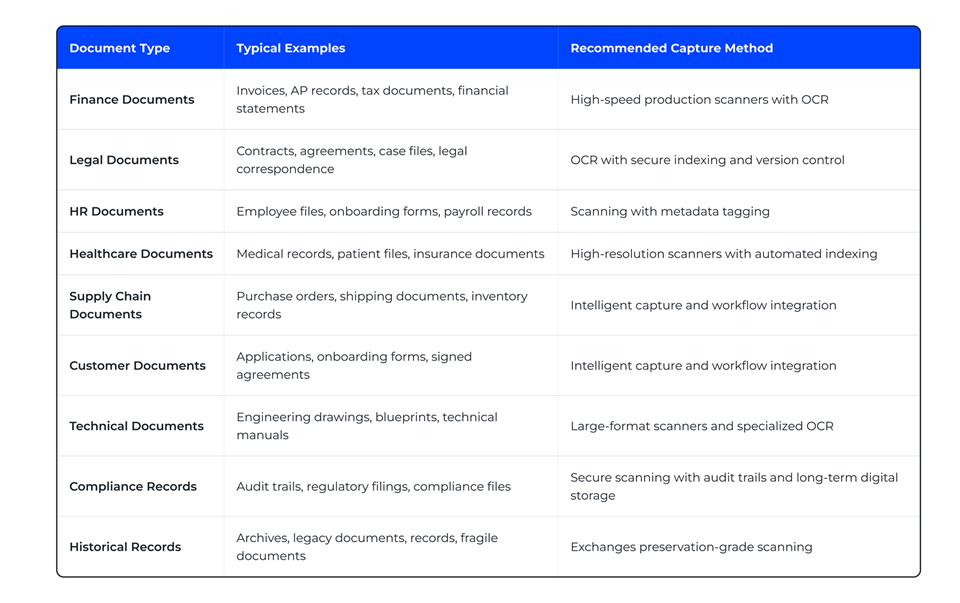
If your organization manages a mix of these, a good digitization partner will help you sequence the work, starting with the records that create the most friction or carry the most compliance weight.
Document Digitization Process: A Step-by-Step Breakdown
The document digitization process is structured into stages, and each stage matters. Skipping steps or rushing through them is one of the most common reasons organizations end up with a digital archive that is just as hard to navigate as the paper one it replaced.
Here is how a typical document digitization process works, step by step.
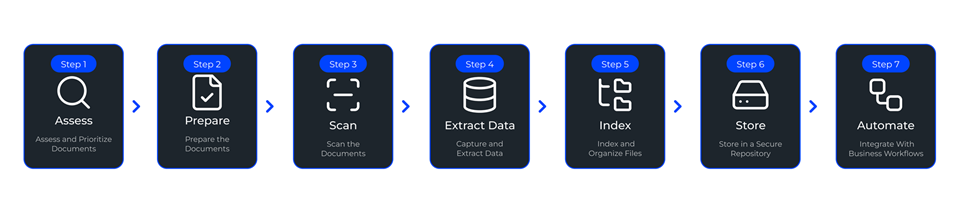
Step 1: Assess and Prioritize Documents
Before anything gets scanned, you need to know what you are working with and where to start.
- Which records does your team access most often?
- Which are tied to compliance requirements?
- Which paper-based processes are creating the most visible delays or risks right now?
Most organizations lead with invoices, HR files, contracts, or customer records, because that is where the friction is highest, and the ROI on digitization is clearest.
Step 2: Prepare the Documents
This step is more important than it sounds, and it is the one most often underestimated.
Before documents go through a scanner, they need to be physically ready: staples and paper clips removed, torn pages repaired, duplicates eliminated, records sorted by type, and batch labels or indexing rules established. Put in low-quality, get out low-quality. The integrity of your digital archive starts here.
Step 3: Scan the Documents
Now the actual scanning happens. The right equipment depends on what you are working with. Desktop scanners work for smaller projects. Production scanners handle high-volume work at speed. Large-format equipment captures blueprints and engineering drawings. Mobile capture tools are used for documents gathered in the field. Output is typically stored as PDF, TIFF, or JPEG, depending on the use case and downstream requirements.
Step 4: Capture and Extract Data
This is where the real transformation happens. OCR and intelligent document processing tools read each scanned file and extract meaningful information automatically. Invoice numbers, customer names, contract dates, employee IDs, policy numbers: these fields get pulled from the image and structured into searchable, usable data. This is the step that converts a digital photograph of a document into an actual business record.
Step 5: Index and Organize Files
Every digitized document gets tagged with metadata: document type, date, customer name, account number, department, and file owner.
These tags become the search handles your team will use every day, so getting them right matters. A clear, consistent indexing strategy is one of the highest-value decisions in any digitization project. How you organize records today determines how fast your team can find them for years to come.
Step 6: Store in a Secure Repository
Digitized files need a home that is both protected and accessible. A document management system, content repository, or cloud platform should support:
- Search and retrieval
- Role-based access
- Version control
- Audit trails
- Backup and disaster recovery
The right system protects your information and puts it in front of the right people when they need it, without getting in their way.
Step 7: Integrate With Business Workflows
This is where digitization stops being a storage project and starts becoming a business transformation. Invoices route automatically into accounts payable. HR forms update employee records without anyone touching them. Customer documents link directly to CRM profiles.
When your digitized records connect to the systems and processes your teams already rely on, the productivity gains compound quickly.
Key Technologies Behind Document Digitization
At present, there are five key technologies behind document digitization that work in combination: optical character recognition, intelligent document processing, document imaging systems, cloud management platforms, and workflow automation. Understanding what each one does helps you evaluate whether a solution is genuinely capable or just a scanning service with a modern interface.
Optical Character Recognition (OCR)
OCR is the foundation on which everything else is built. It reads the printed text inside a scanned image and converts it into machine-readable text. Without OCR, your scanned file is just a picture. You can look at it, but you cannot search it, copy from it, or extract anything useful from it automatically.
With OCR, organizations can:
- Search documents by keyword
- Copy and reuse text
- Find records instantly instead of manually opening files
- Improve compliance and audit retrieval
Intelligent Document Processing (IDP)
If OCR is the foundation, Intelligent Document Processing is what makes the building functional. IDP layers artificial intelligence and machine learning on top of OCR, enabling the system to do more than just read text. It can identify what kind of document it is looking at, whether that is an invoice, a contract, a claim form, or an employee record, and then automatically extract the most relevant fields from each one.
An intelligent document processing platform captures invoice numbers, vendor names, contract dates, customer IDs, and payment amounts automatically, without anyone typing them in. For organizations processing high volumes of documents, that kind of intelligence dramatically reduces processing time, cuts down on errors, and frees staff from some of the most tedious work in the building.
Document Imaging Systems
Document imaging systems are the operational backbone of a digitization program. They handle capturing, storing, organizing, and retrieving digitized files at scale, and they typically include high-speed scanning tools, indexing capabilities, search and retrieval functions, and secure access controls.
These systems are especially important in industries like healthcare, finance, insurance, and government, where the volume of incoming documents is high, retrieval needs to be fast, and the margin for error is low.
Cloud Document Management Platforms
Once documents are digitized, they need somewhere to live that is both secure and easy to reach. Cloud-based document management platforms allow employees to access records from any location while maintaining security and version control.
Cloud platforms provide benefits such as:
- Secure remote access
- Real-time collaboration across teams
- Automatic backup and disaster recovery
- Reduced dependence on physical storage
For organizations with multiple offices, distributed teams, or employees working remotely, this kind of accessibility is not a convenience. It is an operational necessity.
Workflow Automation and RPA
Digitization reaches its full potential when it is connected to automation. Workflow automation and robotic process automation (RPA) allow businesses to route documents, trigger approvals, update records, and archive files automatically the moment a document enters the system.
No manual handoff. No waiting for someone to move a file from one folder to another.
An invoice gets routed for approval. A contract lands in the right department. An HR form updates an employee’s file. The work that used to take a person happens in seconds without one. That is where the real productivity gains live.
Document Digitization Use Cases Across Key Industries
Document digitization addresses a different operational problem in each industry, but the underlying challenge is consistent: paper slows down processes that need to move fast.
Insurance
Insurance organizations deal with a constant, high-volume stream of claims, policy documents, beneficiary forms, customer correspondence, and incoming mail. When those processes depend on paper and manual routing, backlogs are inevitable, claims slow down, and policyholders notice. The cost is not just operational. It shows up in satisfaction scores and retention rates.
XBP’s Digital Mailroom digitizes and automates incoming insurance documents, correspondence, and claims forms. Intelligent scanning, automated routing, and secure digital workflows help insurers cut processing delays, improve end-to-end visibility, and eliminate the manual bottlenecks that slow everything else down.
Recently, XBP helped a Fortune 500 insurance group modernize its document workflows, resulting in a 30% reduction in annual operating costs. Read the full transformation.
Manufacturing and Energy
Manufacturers and energy companies deal with a specific kind of document sprawl: engineering drawings, maintenance records, purchase orders, shipping documents, and operational files spread across multiple facilities and storage locations.
\When a technician needs a specific drawing or a procurement team needs a purchase order, the time spent finding it is time not spent on the actual work. Digitization consolidates those records into a single searchable system and makes sure the right file reaches the right person without delay.
Retail and eCommerce
Retailers move fast, and paper slows them down.
Digitizing invoices, returns documentation, shipping records, vendor contracts, and customer correspondence helps retail organizations process returns faster, resolve disputes more efficiently, keep supplier information accurate, and maintain consistent documentation across every store location and distribution center.
Healthcare
In healthcare, delays are not just inefficiencies. They affect care.
When patient records, referrals, insurance forms, and claims documentation are paper-based, administrative bottlenecks slow down access to information that clinicians and billing teams need quickly.
Document digitization gives healthcare organizations faster access to patient records, fewer paperwork delays, stronger compliance with privacy regulations, and more efficient claims processing.
Banking and Finance (BFSI)
Banks and financial institutions handle enormous volumes of loan applications, account opening forms, checks, statements, and contracts. Manual processing of these documents is slow and introduces compliance risk at every step.
Many financial organizations use intelligent document processing to automatically extract customer and account data from incoming forms, which accelerates onboarding, strengthens fraud detection, and makes audit preparation significantly less painful.
Legal
Legal teams live and die by their documents. Contracts, court filings, client correspondence, discovery materials, and incoming mail all need to be accessible, trackable, and secure. When those records are paper-based, access delays and routing errors create real risk, especially for firms supporting distributed teams or managing a high volume of active matters simultaneously.
XBP’s Digital Mailroom makes incoming legal mail and case-related documents securely accessible to authorized teams from anywhere. Intelligent routing, searchable records, and end-to-end chain-of-custody tracking help legal teams respond faster while keeping confidentiality and compliance intact.
A leading Los Angeles law firm went fully digital in just 10 days by partnering with XBP for document digitization services. Read the full case study here.
Common Challenges in Document Digitization and How to Address Them
Although document digitization offers clear benefits, the process is rarely as simple as scanning paper and storing it in a folder. Many organizations encounter technical, operational, and organizational challenges that can delay projects or reduce the value of the final digital archive.
Poor Document Quality
One of the biggest obstacles is the condition of the original documents. Older files are often faded, torn, wrinkled, stained, or handwritten. Documents that have been photocopied multiple times may also have low contrast or blurred text.
These issues can significantly reduce OCR accuracy, making it harder to search and retrieve information later. Common problems include:
- Faded or discolored paper
- Torn, folded, or damaged pages
- Handwritten notes and signatures
- Poor print quality or low-resolution copies
- Smudges, stains, stamps, and marks
In these situations, documents may require image enhancement, manual cleanup, or even hand-keyed data entry to ensure the final files are accurate and searchable.
Large Volumes of Paper
This one catches almost everyone. Organizations consistently underestimate how much paper they actually have. Years of archived files, boxes across departments, records sitting in off-site storage that nobody has touched in years: it adds up to thousands or millions of pages much faster than expected.
Without a phased approach and clear priorities, large projects can stall before they gain traction. Start with your highest-impact records, prove the process, then scale.
Inconsistent File Naming and Indexing
Scanning without a naming strategy creates a different kind of mess than paper, but it is still a mess. One team saves a file as “Invoice_2024.” Another uses “Inv-April.” A third uses a client code that no one outside that department recognizes. Six months in, finding anything becomes its own project.
Establish your indexing conventions, folder structures, metadata fields, and naming standards before scanning begins. That conversation, while unglamorous, is one of the most valuable things you can do for the long-term usability of your archive.
Security and Compliance Concerns
Digitizing documents often involves handling sensitive information such as financial records, HR files, medical information, contracts, or customer data. As a result, organizations must ensure that their digitization process meets security and compliance requirements.
Key concerns include the following:
- Unauthorized access to confidential files
- Lack of encryption during storage or transfer
- Missing audit trails showing who accessed or changed a document
- Non-compliance with regulations such as HIPAA, GDPR, or industry-specific retention rules
To address these risks, businesses should implement the following:
- Role-based access controls
- Encryption for stored and shared files
- Secure cloud or on-premise storage
- Audit logs and retention policies
Security should be built into the digitization process from the start rather than added after the project is complete.
Resistance to Change
You can implement the best digital system in the world and still have people printing documents and filing them in cabinets out of habit. Resistance usually happens when employees do not clearly see what is in it for them, or when the new system feels harder to use than the old one.
The organizations that see the strongest adoption involve employees early, offer hands-on training, and make the benefits concrete. The moment someone finds a file in five seconds that used to take thirty minutes to track down, the skepticism tends to evaporate.
Document Digitization Best Practices for a Successful Rollout
The organizations that get the most out of document digitization are not necessarily the ones with the biggest budgets. They are the ones who plan before they execute. These document digitization best practices consistently separate successful programs from those that produce a digital archive no one actually uses.
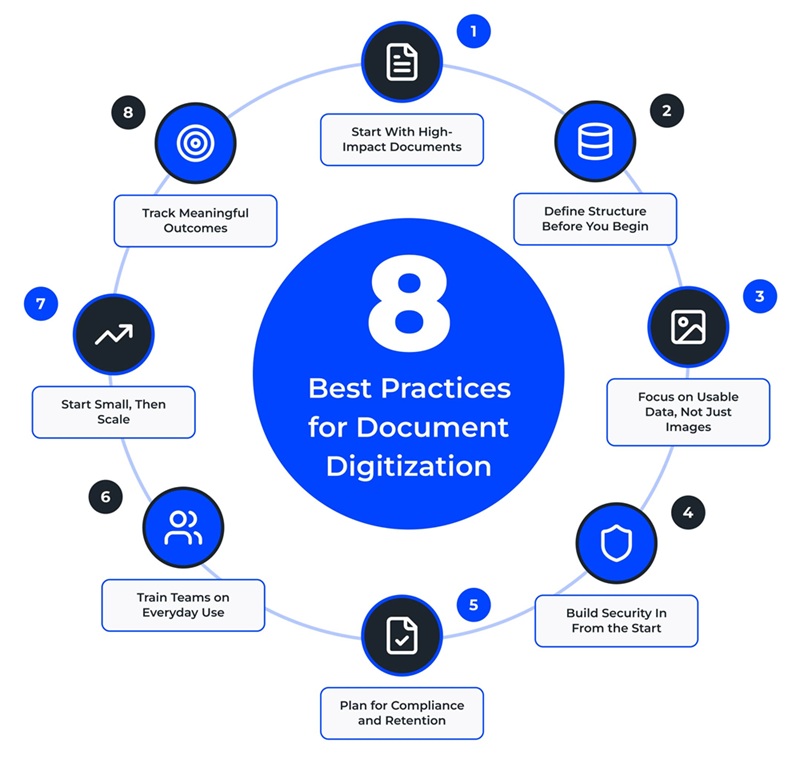
1. Start With High-Impact Documents
Begin where the friction is highest, or compliance risk is greatest. Prioritizing invoices, contracts, or HR records helps you see value faster and builds momentum early in any document digitization effort.
2. Define Structure Before You Begin
Set naming conventions, folder structures, and metadata fields upfront. Without this foundation, even a well-executed rollout can turn into a disorganized archive.
3. Focus on Usable Data, Not Just Images
Scanning alone is not enough. Documents should be searchable, indexed, and usable within workflows, not just stored as static files.
4. Build Security In From the Start
Apply access controls, encryption, and audit tracking early. Trying to add these later often leads to gaps and unnecessary rework.
5. Plan for Compliance and Retention
Think beyond storage. Define how long records should be kept, how they should be handled, and when they should be removed to stay aligned with regulations.
6. Train Teams on Everyday Use
Adoption is critical. Show employees how to find documents quickly, share them, and integrate them into their daily tasks so the system actually gets used.
7. Start Small, Then Scale
Run a pilot with a specific department or use case. Use that experience to refine your approach before expanding across the organization.
8. Track Meaningful Outcomes
Measure improvements in retrieval time, processing speed, error reduction, and cost savings. These are the signals that show whether your document digitization process is delivering real value.
Treat document digitization as a business initiative, not a scanning project, and the results follow.
How to Choose the Right Document Digitization Solution
There is no shortage of document digitization solutions on the market. The difference between a good fit and a poor one often comes down to asking the right questions before you commit. Here is what to evaluate.
1. Start With Your Document Volume and Record Types
Some solutions are designed for a few hundred files in a small office. Others are built to process millions of pages across multiple departments and locations.
Know which category you fall into before you talk to any vendor. Also consider the nature of your records: standard office files, oversized engineering drawings, historical handwritten documents, and high-volume transactional records all have different requirements, and not every platform handles all of them well.
2. Look for Intelligence Beyond Basic Scanning
Scanning produces an image. That is not the same as making information accessible. A stronger solution adds OCR to create searchable text, intelligent data capture to extract key fields automatically, classification to sort documents by type, and validation tools to catch errors before they make it into your systems.
If your organization processes invoices, contracts, or employee records at any volume, intelligent capture is not optional. It is what makes the whole thing worthwhile.
3. Confirm Integration With Your Existing Systems
A digitization solution that sits on its own island is only solving part of the problem. Look for a platform that connects directly with the tools your teams already use: your document management system, ERP, CRM, HR and payroll platforms, and cloud storage and collaboration tools. If employees still have to manually move files between systems, you have shifted the friction, not eliminated it.
4. Build Security and Compliance In, Not On
Document digitization regularly involves sensitive data: financial records, customer files, medical documents, contracts, and HR information.
The right solution protects that information at every stage, in transit and at rest, through encryption, role-based access controls, retention and destruction policies, audit trails, and support for regulations like HIPAA, GDPR, and industry-specific standards. Security is not a feature you add once everything else is working. It is a requirement from day one.
5. Think About Scale Before You Commit
Your needs today are not your needs in three years. A platform that handles one department may buckle under the weight of the full organization.
Choose a solution that can grow with you, handling higher volumes, new document types, additional locations, and AI-driven processing as your capabilities and ambitions expand. The cost of replacing a digitization platform mid-program, both in time and disruption, is steep.
6. Weigh In-House vs. Managed Services Honestly
Some organizations prefer to manage digitization internally, while others work with a specialized provider.
In-house digitization may offer more direct control, but it often requires:
- Scanning equipment and software
- Dedicated staff and training
- Time for indexing, quality checks, and storage management
A managed document digitization partner can often deliver:
- Faster turnaround times
- Better scanning and OCR accuracy
- Access to specialized equipment and expertise
- Reduced burden on internal teams
For organizations with large archives or complex document requirements, managed services are often the faster and more cost-effective option.
Why Enterprises Choose XBP Global for Document Digitization
Digitization done well is not just a technology problem. It is an operational one. It requires understanding how documents actually move through a business, where the friction lives, and how to connect capture, extraction, storage, compliance, and automation into something that works as a whole, not just as a collection of tools.
At XBP Global, we work with organizations that are ready to move past the idea of digitization as a filing upgrade. Our approach is built around improving how information flows, reducing the manual work that slows teams down, and creating the foundation that makes future automation possible.
Why businesses choose XBP Global:
- High-volume document capture and processing for both active and archived records
- Advanced OCR and intelligent data extraction to turn documents into usable business information
- Secure, compliant workflows with role-based access, audit trails, and retention controls
- Integration with ERP, CRM, HR, finance, and content management systems
- Scalable global delivery and managed services to support enterprise-wide digitization initiatives
- A connected approach that links document digitization with intelligent automation, digital mailroom, and content services
Whether you are digitizing invoices, employee records, contracts, customer files, or historical archives, XBP Global helps you create a smarter, more connected way to manage information across the business.
Ready to see what that looks like for yours? Contact XBP Global today.
References:
- U.S. businesses spend an estimated $8 billion every year simply managing paper, and it can cost as much as $120 to find a single misplaced document.
[ Corpmagazine]
FAQs About Document Digitization
What types of businesses benefit most from document digitization?
Any organization dealing with large volumes of paper can benefit, but the impact is especially significant in healthcare, finance, legal, HR, manufacturing, insurance, and government, where high-value records move through compliance-sensitive processes every day.
Can handwritten documents be digitized?
Yes, though the process requires some nuance. Handwritten documents can be scanned and stored digitally, but OCR accuracy varies depending on how legible the handwriting is. For documents where extracting specific data matters, intelligent capture tools or manual data entry may be needed alongside automated processing.
What is the cost of document digitization?
It depends on several factors: the volume of records, their condition, the complexity of indexing required, document size, and the level of processing involved. Simple scanning projects can run just a few cents per page. Large-scale programs involving OCR, intelligent capture, and workflow integration involve a broader project-based investment shaped by your specific requirements.
Is document digitization secure?
Yes. Modern digitization solutions are built with security in mind, using encryption, role-based access controls, audit trails, retention policies, and secure storage environments. In most cases, a well-implemented digital archive is significantly more secure and auditable than paper files sitting in cabinets or off-site storage facilities.
Should I digitize documents in-house or outsource?
Smaller, lower-complexity projects can often be handled internally. Organizations with large archives, sensitive records, strict compliance requirements, or complex indexing needs typically get faster, more accurate results by outsourcing to a specialist. The economics usually favor managed services when the volume or complexity crosses a certain threshold.
Can AI be used in document digitization?
Yes. AI is increasingly used in document digitization through technologies such as Intelligent Document Processing (IDP). AI can automatically identify document types, extract important information, classify records, detect errors, and route documents into the correct workflow. This reduces manual data entry, improves accuracy, and helps organizations process large volumes of documents more efficiently.
Case Study
Fortune 500 Insurer Cuts Costs 30% with Digital Mailroom
Fortune 500 insurance group accelerated cash flow by $20M and cut operational costs 30% annually with XBP DMR’s automated mail processing solution.
