

If your organization still relies on microfiche cabinets, aging reader machines, or decades-old film archives, finding a single document can take hours. A single request often means locating the correct fiche sheet, loading it into a reader, manually scanning through frame after frame, and hoping the image is still readable. That process is becoming increasingly difficult. Older fiche fade over time, film can crack or warp, and many organizations no longer have functioning readers or staff familiar with the format. More importantly, microfiche archives cannot integrate with modern document management systems, enterprise content platforms, or digital workflows.
Microfiche to digital conversion solves this problem by converting fiche into high-resolution, searchable digital files that can be accessed instantly, shared securely, and preserved for the long term. Instead of relying on physical archives, organizations can retrieve decades of historical records in seconds through OCR-enabled search.
Industry estimates indicate that the global microfilm and microfiche scanning market is projected to grow from USD 191.2 million in 2025 to USD 264.5 million by 2035. Businesses that digitize legacy records can also reduce document retrieval times by up to 90% while lowering storage and administrative costs.[1]
This guide explains what microfiche digitization is, the different fiche types you may encounter, how the process works, how much it costs, and what to consider before deciding whether to digitize in-house or outsource the project.
What Is Microfiche Digitization?
Microfiche digitization is the process of converting microfiche sheets, flat sheets of film containing miniaturized images of documents, into digital files such as searchable PDFs, TIFFs, JPEGs, or PDF/A archives.
Although many people think of digitization as simply scanning images, an effective microfiche conversion project involves much more than that. A professional process typically includes:
- High-resolution image capture
- Cleaning and enhancement of damaged images
- Optical Character Recognition (OCR)
- Metadata tagging and indexing
- Integration into document management systems
The goal is not merely to create a digital copy, but to transform static film archives into records that can be searched, retrieved, shared, and used across the business.
For example, a bank with decades of customer statements on COM fiche can convert those archives into searchable files that are instantly available during audits. A municipality can digitize land records so employees and citizens no longer need to visit a physical archive room to retrieve them.
Learn more about how a document digitization solution can help transform paper and film-based records into accessible digital assets.
Why Organizations Are Digitizing Microfiche
Many organizations continue to store information on microfiche because it was once the most efficient way to preserve thousands of documents in a compact format. However, what was once a space-saving solution has now become an operational bottleneck.
Keeping records on fiche often means:
- Manual retrieval that can take hours
- Increasing risk of faded or damaged records
- Dependence on outdated readers and equipment
- Difficulty supporting audits, compliance, or remote access
- Growing storage costs for physical archives
After digitization, those same records become:
- Searchable within seconds
- Accessible from multiple locations
- Easier to secure and back up
- Better aligned with compliance and retention requirements
- Simpler to integrate into existing systems
In other words, digitization changes microfiche from an archive that stores information into a system that actively supports the business.

Microfiche vs. Microfilm: Understanding the Difference
Before planning a digitization project, it is important to understand whether you have microfiche or microfilm. The two terms are often used interchangeably, but they are not the same.
A microfiche is a flat sheet of film, usually around 4 × 6 inches, containing a grid of miniaturized images of documents. Microfilm, by contrast, is stored on a reel or roll. While both formats preserve documents photographically, they require different handling methods and different scanning equipment.
Microfiche is commonly used for:
- Customer records
- Government filings
- Historical newspapers
- Legal documents
- Engineering drawings
Microfilm is more common for large archive collections, newspapers, and continuous records stored on reels. For a detailed look at how reel-based archives are converted, read our guide on Microfilm to Digital Conversion.
Understanding which format you have is important because it affects project cost, scanner selection, and turnaround time.
Types of Microfiche You Can Digitize
Not all microfiche is the same. Different fiche types have different image densities, formats, and handling requirements. Identifying the type of fiche in your archive is one of the first steps in planning a successful digitization project.
Standard or Jacketed Microfiche
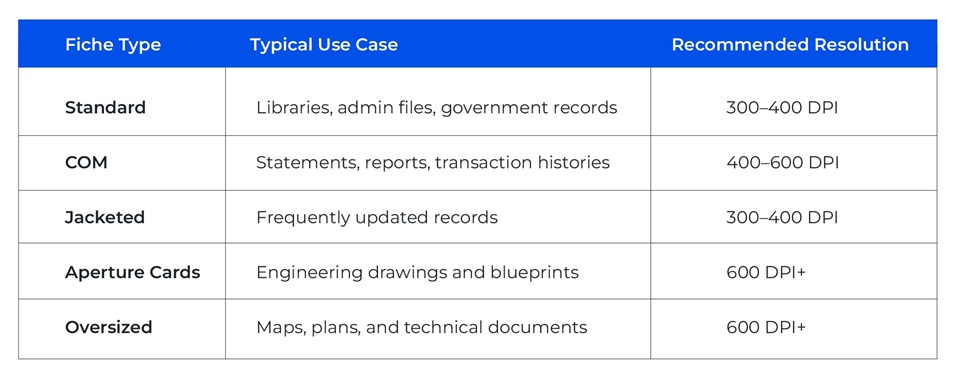
Standard fiche is the most common format and is often found in libraries, administrative archives, government records, and business files. A typical sheet contains 60 to 100 document images arranged in rows and columns.
Jacketed fiche uses transparent sleeves that hold microfilm strips. Because these sleeves can become fragile over time, they often require more careful handling during scanning.
COM (Computer Output Microfiche)
A COM fiche is generated directly from computer systems and is widely used in banking, insurance, and financial services. These fiche often contain reports, statements, invoices, and transaction logs.
Because a COM fiche may contain 200 to 300 images per sheet, they require higher-resolution scanning and strong OCR capabilities to ensure all the text remains searchable.
Aperture Cards and Oversized Fiche
Engineering firms and manufacturers frequently use aperture cards and oversized fiche to store technical drawings, maps, and blueprints. These images contain fine detail, which means they usually require 600 DPI or higher to produce a usable digital file.
The table below provides a simple way to identify which scanning approach is most suitable for your fiche type:
How Microfiche Digitization Works (Step-by-Step Process)
A successful microfiche digitization project follows a structured workflow. Skipping steps or rushing the process often leads to poor image quality or unusable outputs.
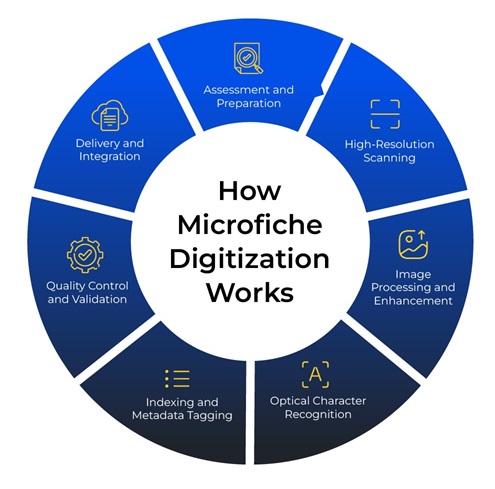
1. Assessment and Preparation
The process begins with evaluating:
- Volume of fiche
- Condition (scratches, fading, warping)
- Required output format (PDF, TIFF, JPEG)
- Metadata and indexing requirements
Damaged or dirty fiche are cleaned carefully to avoid scanning artifacts.
2. High-Resolution Scanning
Specialized microfiche scanners are used to capture each frame. Unlike standard document scanners, these machines:
- Adjust for magnification
- Correct distortion
- Handle varying exposure levels
Resolution typically ranges between 300 to 600 DPI, depending on the use case.
3. Image Processing and Enhancement
Raw scans often require post-processing:
- De-skewing
- Contrast adjustment
- Noise reduction
- Frame separation
This step ensures the images are legible and consistent.
4. Optical Character Recognition (OCR)
OCR technology extracts text from scanned images, enabling:
- Keyword search
- Data extraction
- Integration into enterprise systems
Accuracy depends heavily on the original image quality and resolution.
5. Indexing and Metadata Tagging
Files are tagged with relevant metadata such as:
- Document type
- Date
- Reference numbers
- Department
This is critical for retrieval and compliance.
6. Quality Control and Validation
A robust QC process checks:
- Image clarity
- Completeness
- OCR accuracy
- File naming consistency
7. Delivery and Integration
Final files are delivered via:
- Secure cloud storage
- Enterprise content management systems
- Document management platforms
How to Choose the Right Scan Resolution
One of the most common questions organizations ask is which DPI to use. The answer depends on the type of document and how the files will be used after digitization.
For standard text records, 300 to 400 DPI is usually enough to produce clear, searchable images. However, if the fiche contains faded text, very small print, or engineering drawings, a higher resolution is necessary.

Higher DPI improves readability and OCR accuracy, but it also increases file size and cost. For that reason, many organizations begin with a pilot scan of a small sample before committing to a full project.
Common Challenges in Microfiche Digitization
Despite being a well-established process, microfiche digitization is rarely simple. Older archives often contain fiche in different formats and conditions, making it difficult to apply a single scanning approach across the entire collection. Here are few of the most common challenges:
1. Image Degradation and Aging
Over time, microfiche can deteriorate due to age, storage conditions, and repeated handling. Common issues include:
- Fading or low contrast caused by chemical aging
- Scratches and abrasions from frequent use
- Warping or curling due to heat and humidity
- Dust, mold, or residue buildup on the film
These issues reduce image clarity and often require pre-scan cleaning, exposure adjustments, and post-processing to improve readability.
2. Inconsistent Fiche Formats
Not all fiche follow the same layout or image density. Standard fiche, COM fiche, jacketed fiche, and aperture cards each require different scanner settings, resolutions, and handling methods.
As a result, operators often need to make manual adjustments throughout the project to maintain consistent output quality.
3. OCR Accuracy Limitations
OCR works best when the original fiche is clear and high contrast. Faded text, handwritten notes, unusual layouts, or low-quality originals can reduce OCR accuracy.
Common OCR challenges include:
- Misread characters or numbers
- Incomplete text extraction
- Difficulty reading handwritten annotations
- Lower search accuracy in the final archive
To improve results, many projects require image enhancement and manual review after OCR is completed.
4. Large Volumes and Long Timelines
Many organizations have archives containing thousands of fiche sheets accumulated over decades. Scanning, indexing, and quality-checking these records can take significant time, particularly when the project includes OCR and metadata tagging.
Without a structured workflow, large projects can quickly become difficult to manage.
5. Fragile and Difficult-to-Handle Media
Microfiche is delicate, especially if it is old or stored in poor conditions. Improper handling during preparation or scanning can cause permanent damage.
Special care is often required for:
- Cracked or brittle fiche
- Jacketed fiche with fragile sleeves
- Oversized fiche and aperture cards
- Fiche with heavy wear or residue
What It Takes to Overcome These Challenges
Successful microfiche to digital conversion requires more than a scanner. High-quality results depend on a combination of:
- Specialized microfiche scanning equipment
- Advanced image enhancement and OCR tools
- Consistent indexing and metadata processes
- Skilled operators and quality-control teams
- A structured workflow that balances speed, accuracy, and scalability
When these elements are in place, organizations can create digital archives that are not only clear and searchable but also practical for everyday business use.
Business Benefits of Microfiche Digitization
Microfiche digitization is often viewed as an archival exercise, but in reality, it creates measurable business benefits like the following:
1. Faster Access to Information
Digitized records can be retrieved in seconds instead of hours. Employees no longer need to search through cabinets, load fiche into reader machines, or manually scroll through frames to find a specific document.
2. Stronger Compliance and Audit Readiness
Digital files can be indexed, tracked, and retrieved quickly during audits, legal requests, or regulatory reviews. Searchable records also make it easier to meet retention and compliance requirements.
3. Lower Physical Storage Costs
Reducing or eliminating microfiche cabinets frees up office and archive space. Organizations can also lower the costs associated with storage, maintenance, and legacy reader equipment.
4. Better Security and Disaster Recovery
Unlike physical fiche, digital records can be
- Encrypted and password-protected
- Backed up across multiple locations
- Protected through role-based access controls
- Recovered quickly in the event of fire, flood, or damage
5. Improved Collaboration Across Teams
Digitized records can be accessed by multiple users simultaneously, regardless of location. This makes it easier for distributed teams, branch offices, and remote employees to work with the same information.
6. Long-Term Preservation of Historical Records
Digitization protects aging fiche from further deterioration while ensuring that valuable historical records remain accessible for years to come. This is especially important for archives containing legal files, engineering drawings, government records, or historical collections.
How Much Does Microfiche Digitization Cost?
The cost of microfiche digitization depends on several factors, including the type of fiche, the archive’s condition, the required resolution, and whether OCR and indexing are included.
Standard fiche typically costs between $1.25 and $1.30 per sheet to digitize, while COM fiche, which contains more images and often requires additional OCR, may cost between $3 and $5 per sheet.
Additional services such as metadata entry, OCR validation, or rush turnaround times can increase the total cost.
When comparing vendors, organizations should avoid focusing only on cost per sheet. The cheapest quote may not include OCR, quality assurance, metadata, or the ability to integrate files into existing systems.
In-House vs Outsourced Digitization
Organizations often wonder whether they should digitize microfiche internally or outsource the project.
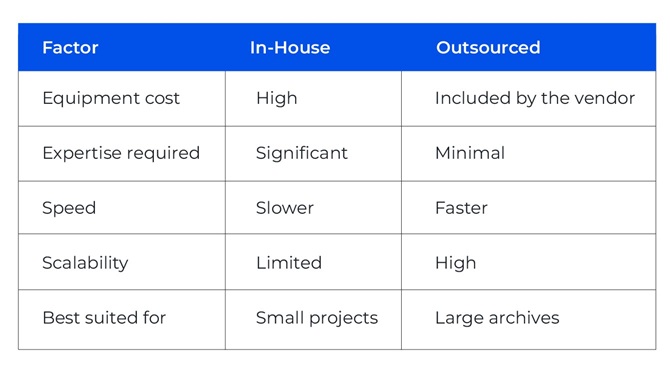
In-house digitization may seem attractive because it provides direct control over the records. However, it usually requires a significant investment in scanners, software, training, and staff time.
Outsourcing is often more practical for large or complex archives because specialized vendors already have the equipment and expertise required.
Why Leading Organizations Choose XBP Global for Microfiche Digitization
For organizations with years of accumulated fiche, outsourcing is often the fastest and most effective approach. It delivers better image quality, stronger OCR accuracy, and faster turnaround than most in-house projects. Microfiche may once have been an efficient storage format, but today it slows access, increases costs, and creates compliance challenges. Digitization transforms aging fiche into searchable, secure digital records that are easier to access and manage.
The best place to start is with a small pilot scan. Identifying your fiche type, estimating volume, and testing a sample first helps ensure the right approach before scaling the project. At XBP Global, we help organizations take that next step through end-to-end microfiche digitization services, from scanning and OCR to indexing and system integration.
Ready to turn your microfiche archives into searchable digital records?
References:
- The global microfilm and microfiche scanning market is projected to grow from USD 191.2 million in 2025 to USD 264.5 million by 2035, driven by the ongoing digitization of archival records. (futuremarketinsights)
FAQs About Microfiche Digitization
How many images are usually on one microfiche sheet?
A standard microfiche sheet typically contains 60 to 100 images, depending on the reduction ratio and format.
What DPI is recommended for microfiche digitization?
Most projects use 300-600 DPI, with higher resolutions recommended for detailed documents such as engineering drawings.
Are digitized microfiche files admissible for legal and audit purposes?
Yes, provided the digitization process follows proper quality control, indexing, and compliance standards, digital copies can be used for legal and audit purposes.
How long does a typical microfiche digitization project take?
Timelines vary by volume and complexity, with projects ranging from a few weeks to several months.
What happens to the original microfiche after digitization?
Organizations can choose to:
- Retain them for archival purposes
- Store them offsite
- Securely dispose of them, depending on compliance requirements
Case Study
Fortune 500 Insurer Cuts Costs 30% with Digital Mailroom
Fortune 500 insurance group accelerated cash flow by $20M and cut operational costs 30% annually with XBP DMR’s automated mail processing solution.
